
安装学习 Hyper-V
浏览量:3
安装 Hyper-V
适用于: ✅ Windows Server 2025, ✅ Windows Server 2022, ✅ Windows Server 2019, ✅ Windows Server 2016, ✅ Windows 11, ✅ Windows 10, ✅ Azure Local 2311.2 and later
检查 Windows 系统要求
Windows 10(专业版或企业版),或 Windows 11(专业版或企业版)
具有二级地址转换的 64 位处理器(SLAT)。
CPU 支持 VM 监视器模式扩展(Intel CPU 上的 VT-c)。
最小内存为 4 GB。
启用 Hyper-V
若要使用 PowerShell 在 Windows 上启用 Hyper-V,请执行以下作:
在 Windows 桌面上,选择“开始”按钮并键入名称 Windows PowerShell 的任何部分。
右键单击 Windows PowerShell,然后选择“ 以管理员身份运行”。
重要
必须以管理员身份运行 PowerShell,否则命令将失败。
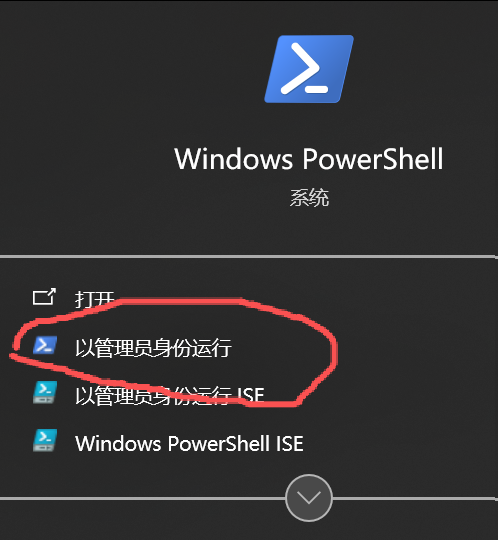
PowerShell
Enable-WindowsOptionalFeature -Online -FeatureName Microsoft-Hyper-V -All


输入 Y ,让计算机重启以完成安装
若要使用 DISM 在 Windows 上启用 Hyper-V 角色,
部署映像服务和管理工具(DISM)可帮助配置 Windows 和 Windows 映像。 在其许多应用程序中,DISM 可以在作系统运行时启用 Windows 功能。
在 Windows 桌面上,选择“开始”按钮并键入名称 Windows PowerShell 的任何部分。
右键单击 Windows PowerShell,然后选择“ 以管理员身份运行”。
键入以下命令:
PowerShellDISM /Online /Enable-Feature /All /FeatureName:Microsoft-Hyper-V
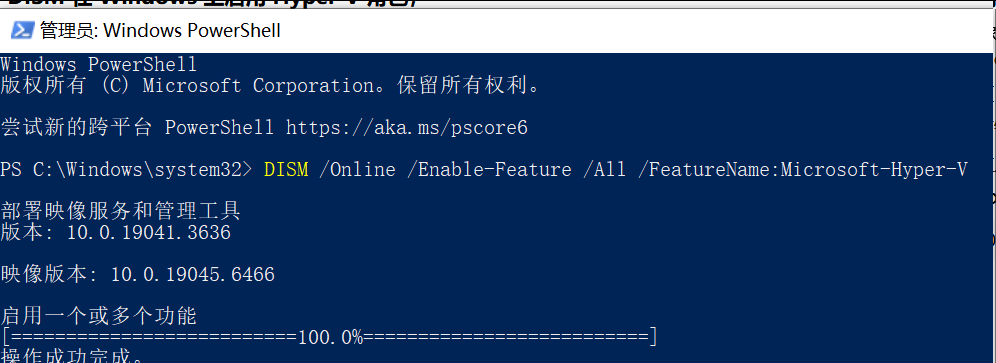
可以看到该功能已启用,并且“作已成功完成”。
神回复
发表评论:
◎欢迎参与讨论,请在这里发表您的看法、交流您的观点。